
This was my first main automation in Excel VBA. I was working a lot on SAP data and modifying it in Excel on the daily basis. Almost every day tons of same routine for get the data. One day I thought to myself about automation. I knew that I can record my activity in Excel, but did not know at all how to connect to SAP using Excel VBA?

Open SAP application
Firstly, if we don’t want to open SAP manually, we need to provide its directory.
'Change for your file directory
Shell "C:\Program Files (x86)\SAP\FrontEnd\SAPgui\saplogon.exe", 4
Set WshShell = CreateObject("WScript.Shell")
Then just wait for the activation of application, because sometimes it can lasts longer than usually.
Do Until WshShell.AppActivate("SAP Logon ")
    Application.Wait Now + TimeValue("0:00:01")
Loop
Set SAP app as object
After that we should set some objects to handle SAP.
Set SapGui = GetObject("SAPGUI")
Set Appl = SapGui.GetScriptingEngine
Set Connection = Appl.Openconnection("paste name of module", True)
Set session = Connection.Children(0)
In Connection object put the name of the module you want to connect (from the SAP Logon Module screen below). It is important to put proper name, in other case You won’t connect.
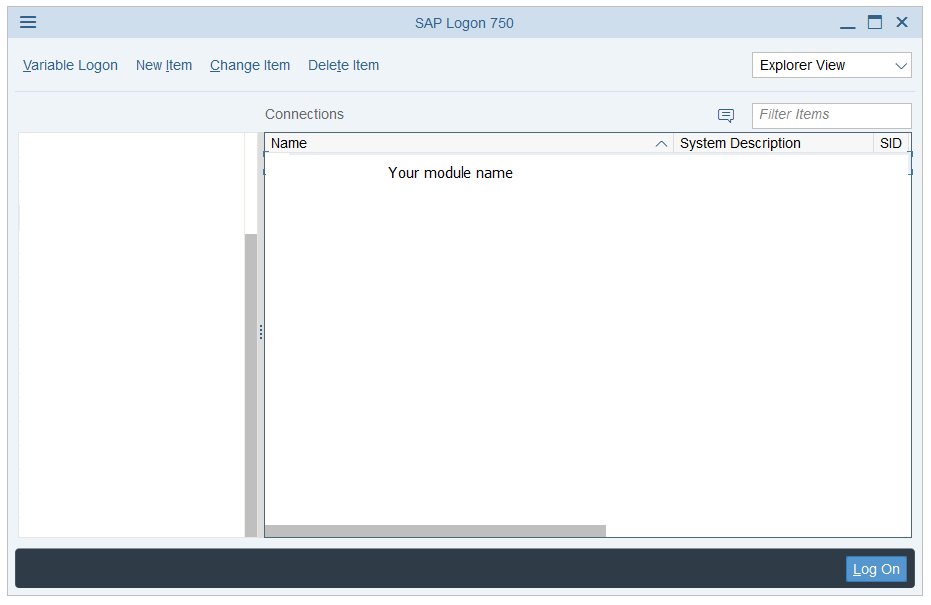
Log in with the data
In my case there was no need to login and write password, but if it is neccessary in your case I am also prepared for that.
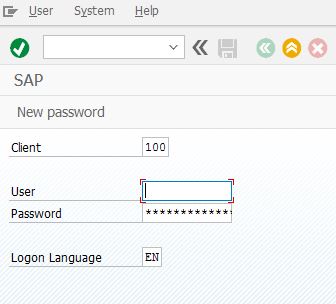
'if You need to pass username and password
session.findById("wnd[0]/usr/txtRSYST-MANDT").Text = "100"
session.findById("wnd[0]/usr/txtRSYST-BNAME").Text = "user"
session.findById("wnd[0]/usr/pwdRSYST-BCODE").Text = "password"
session.findById("wnd[0]/usr/txtRSYST-LANGU").Text = "EN"
In first row there is unit number, in second put your user login, in third your password and in the last row choose language.
Check if it’s already opened
I also implemented to my SAP code check if it is already opened.
If session.Children.Count > 1 Then

    answer = MsgBox("You've got opened SAP already," & _
"please leave and try again", vbOKOnly, "Opened SAP")

    session.findById("wnd[1]/usr/radMULTI_LOGON_OPT3").Select
    session.findById("wnd[1]/usr/radMULTI_LOGON_OPT3").SetFocus
    session.findById("wnd[1]/tbar[0]/btn[0]").press

    Exit Sub

End If
In the end of connection, code is approving all the things from above and You are ready to do anything SAP.
session.findById("wnd[0]").maximize
session.findById("wnd[0]").sendVKey 0
After that You can put your code, which is operating in SAP system. You can do this for example by script recording in Options.
Full code:
Sub SapConn()

Dim Appl As Object
Dim Connection As Object
Dim session As Object
Dim WshShell As Object
Dim SapGui As Object

'Of course change for your file directory
Shell "C:\Program Files (x86)\SAP\FrontEnd\SAPgui\saplogon.exe", 4
Set WshShell = CreateObject("WScript.Shell")

Do Until WshShell.AppActivate("SAP Logon ")
    Application.Wait Now + TimeValue("0:00:01")
Loop

Set WshShell = Nothing

Set SapGui = GetObject("SAPGUI")
Set Appl = SapGui.GetScriptingEngine
Set Connection = Appl.Openconnection("paste name of module", _
    True)
Set session = Connection.Children(0)

'if You need to pass username and password
session.findById("wnd[0]/usr/txtRSYST-MANDT").Text = "900"
session.findById("wnd[0]/usr/txtRSYST-BNAME").Text = "user"
session.findById("wnd[0]/usr/pwdRSYST-BCODE").Text = "password"
session.findById("wnd[0]/usr/txtRSYST-LANGU").Text = "EN"

If session.Children.Count > 1 Then

    answer = MsgBox("You've got opened SAP already," & _
"please leave and try again", vbOKOnly, "Opened SAP")

    session.findById("wnd[1]/usr/radMULTI_LOGON_OPT3").Select
    session.findById("wnd[1]/usr/radMULTI_LOGON_OPT3").SetFocus
    session.findById("wnd[1]/tbar[0]/btn[0]").press

    Exit Sub

End If

session.findById("wnd[0]").maximize
session.findById("wnd[0]").sendVKey 0 'ENTER

'and there goes your code in SAP

End Sub
Summary
It took me couple of hours to find information in web how to connect to SAP via Excel VBA and finally set this up as code. After that I was only doing copy paste that to my next macros.
I just wanted to save your time, because I know how long and painful was that for me.
This code already helped one guy from StackOverflow – I hope it will help You too.
I also invite you to the next article in this series!
SAP session.findbyid – 10 code lines you can identify

I really appreciate your help with my project!
I am very happy that I could help someone 🙂
Thanks for this code. it really solved the problem.
But I need to click when it attaches to the session ( saying “yes”) and again when script starts.
Could you suggest to login without clicking “yes” anywhere?
Hello Vinay
Do You mean this?
https://simpleexcelvba.com/how-to-get-rid-of-sap-scripting-pop-ups/
If not I need more details like for example screenshot 🙂
you are the man Tomasz !
Thanks a lot. though it was tiny issue but indeed restricting the full automation.
Thanks again.
cheers.
Thank You too! 🙂
how to get no of rows in any grid and get is displayed.
I need to loop a code repeating no of rows times.
help ?
Hello
First of all, lets not spam the comment section with questions which are not connected with the topic of the article 🙂
Second, check my other SAP articles, like this one: https://simpleexcelvba.com/how-to-deal-with-sap-tables-part-1/
If You still got a questions, but not related to the topic, used About Me or Contact me tab 🙂
I had a error when was runned:
Set session = Connection.Children(0)
Then was necessary run RZ11 transaction to enable SAPGUI Scripting
Choose for sapgui/user_scripting
Change FALSE to TRUE in Actual Value
Yes this is actually described in my other article:
Record macro in SAP using SAP Script Recording
It’s really a nice and helpful piece of information. I am happy that you shared this useful info with us. Please stay us informed like this. Thank you for sharing.| а
Happy to hear that, thank you 🙂
hi Thomas, can you please tell me where do i find the “name of the module”
Set Connection = Appl.Openconnection(“paste name of module”, _
True)
Hello
This is the name of the environment, where You want to work/ use transactions etc 🙂
Thanks for sharing this code.
It was so helpful and worked like a charm.
I really love the developer community , sharing code is such a great part of the developer community DNA. Why re invent the wheel 🙂
Totally agree 🙂
If session.Children.Count > 1 Then
answer = MsgBox(“You’ve got opened SAP already,” & _
“please leave and try again”, vbOKOnly, “Opened SAP”)
session.findById(“wnd[1]/usr/radMULTI_LOGON_OPT3”).Select
session.findById(“wnd[1]/usr/radMULTI_LOGON_OPT3”).SetFocus
session.findById(“wnd[1]/tbar[0]/btn[0]”).press
Exit Sub
End If
This part of code do nothing in my case. Is this to terminate multiple seesion login? Please explain the purpose in more detail. By the way, a big thanks, your code is very crispy to use and understand.
Ok.. I got the reason.
session.findById(“wnd[0]”).maximize
session.findById(“wnd[0]”).sendVKey 0
This enter command is to be before if loop i.e. connection testing loop. It is now working like a charm. Thanks a ton. You saved my lot of time.
Yes, this part is detecting if there is more than 1 session already opened.
Glad to hear that, appreciate that 🙂
Hello, thank you that’s exactly what I was looking for. thanks to you I think saved a lot of time because I was currently obliged to have SAP open and connected. do you know if there will be a test version of SAP that I could install on my personal machine so that I can continue my project at home? thank you very much again.
I haven’t yet looking for that kind of thing, but it would be great to have it for video tutorial purpose.
If I find that, You will see this here on website for sure. If You will be faster than me I’ll be thankful for sharing it here. Thank You too 🙂
It really helped me. Thank you so much Tomasz.
You’re welcome 🙂
Hi Tomasz!
Thanks for all the info, very helpful. I’m gettin an error “605: he ‘Sapgui Component’ could not be instantiated”. Are you familiar with this? I’m using SAP 740.
Thanks again
Not really, but it depends on your code and which line the error appears.
Hi Tomasz, thank you for your response! It was due to a version issue, I had 740 and just upgraded to 750 and it works incredibly. Thanks!
hello looking on the internet i found this.
https://blogs.sap.com/2018/09/13/as-abap-7.52-sp01-developer-edition-concise-installation-guide/
I think this is what I was looking for I will do the tutorial and see where it leads me :). the first who arrives to implement the trial service will give the information to others 👍.
Small SAP script question did you succeed with Excel to print in PDF format? or use Microsoft print to pdf and take control of the window to enter the file name automatically. I’m tearing my hair out. Thank you in advance.
I don’t want to spoil your enthusiasm, but I don’t think this tutorial is for home users, but rather how to install an SAP server. =(
According to your pdf question, try this.
Please ask questions connected to the topic of article next time (not to make a “spam”) 🙂
ThisWorkbook.Worksheets("Sheet1").Range("A1:N24").ExportAsFixedFormat Type:=xlTypePDF, _filename:=filename, _
Quality:=xlQualityStandard, _
IncludeDocProperties:=True, _
IgnorePrintAreas:=False, _
OpenAfterPublish:=True
I’m sorry, I won’t do it again. thank you for the piece of code, but i’m already using it and it doesn’t do what i want to do with the print sent by SAP. Thanks again. I will try when the test server and keep you posted if the tests are successful. Good night.
Hi Tomasz, Thank your input.
This code below does not work, it don’t populate the account and password automatically. Is it for safety reasons?
Thanks
'if You need to pass username and passwordsession.findById("wnd[0]/usr/txtRSYST-MANDT").Text = "900"
session.findById("wnd[0]/usr/txtRSYST-BNAME").Text = "user"
session.findById("wnd[0]/usr/pwdRSYST-BCODE").Text = "password"
session.findById("wnd[0]/usr/txtRSYST-LANGU").Text = "EN"
It’s really weird it is not filling that fields.
Try to record macro by yourself and see what is in the recorded code. 🙂
Hi Tomasz, thank you for your help..
For the part bellow, it’s not working for me, I can run sSAP program several time and I don’t get the msg bellow if the session was already opened
————————————
If session.Children.Count > 1 Thenanswer = MsgBox("You've got opened SAP already," & _
"please leave and try again", vbOKOnly, "Opened SAP")
session.findById("wnd[1]/usr/radMULTI_LOGON_OPT3").Select
session.findById("wnd[1]/usr/radMULTI_LOGON_OPT3").SetFocus
session.findById("wnd[1]/tbar[0]/btn[0]").press
Exit Sub
End If
Hello, I appreciate your feedback.
I checked the code once again and I can see that on the newest version of SAP this part of code can’t see more than 1 session, so will not work.
Good point 🙂
Great blog post really helpful.
I am having another issue in this regard that I am hoping that you have a solution.
I have created a macro to run MARC table and I need to choose specific fields in this table. For this, I have used approach as following example:
session.findById("wnd[0]/mbar/menu[3]/menu[2]").selectsession.findById("wnd[1]/usr/chk[2,8]").selected = true
But, now the problem is that the number of Rows on
wnd(1)keeps changing everytime out IT team updates SAP.Is there a way to select these rows of Field using their technical name? Se example below for names I have extracted for these selection window.
X MATNR Material
X WERKS Plant
PSTAT Maintenance status
X LVORM DF at plant level
BWTTY Valuation Category
XCHAR Batch management
MMSTA Plant-sp.matl status
MMSTD Valid from
X MAABC ABC Indicator
KZKRI Critical Part
X EKGRP Purchasing Group
AUSME Unit of issue
DISPR MRP profile
X DISMM MRP Type
X DISPO MRP Controller
KZDIE MRP controller=buyer
PLIFZ Planned Deliv. Time
WEBAZ GR Processing Time
PERKZ Period Indicator
AUSSS Assembly scrap (%)
X DISLS Lot size
X BESKZ Procurement type
I have not been dealing with looping through SAP Tables yet.
But after your comment I tried to dig into this topic and… it’s a whole material for full article 🙂
Long story short – if
session.findById("wnd[1]/usr/chk[2,8]")is your checkbox, so You need to deal with its parentsession.findById("wnd[1]/usr/chk[2,8]").Parentorsession.findById("wnd[1]/usr")– it has all the information about rows and columns to let You loop through.If it’s not enough, You need to be patient and wait for the article, where I’ll describe what I found out in case of SAP Tables and their fields like text or checkbox. 🙂
I already described your issue, probably my posts can solve your problems 🙂
How to deal with SAP tables – part 1
How to deal with SAP tables – check boxes (part 2)
Hope You will enjoy 🙂
Dear Tomasz Płociński,
I was very puzzled that I tried to run your VBA code, it was always stuck at “Set session = Connection.Children(0)”. Error message said “Run-time error ‘614’: The enumerator of the collection cannot find en element with the specified index.” Kindly give me an advice.
I did not have any similar issue yet, but according to this:
– check if scripting is activated in SAP
– try to change from 0 to 1 in
.Children(0), both insessionandConnection– if nothing helped, re-installation of SAP Logon app can help.
Dear Tomasz Płociński,
Thank you for your reply. I did try your method but it was failure. Unfortunately, this SAP software was unable to reinstall due to the controller of my company, so I unable to do so.
Can You try there also instead of 0 to put: “0” or 0+0 or CLng(“0”) or CLng(0) ?
Hey Tomasz,
I was so excited to see this code.
But I am having the same issue with
Set session = Connection.Children(0)even when it is changed from 0 to 1
And also I am not allowed to re-install SAP.
Hello Teddy
Did You check if scripting is activated in SAP?
Check also if the name of connection is correct
Set Connection = Appl.Openconnection("paste name of module", True)I can open until the login page, then connection.children error
Try to change the name of
Connectionobject, for example toconn1Don’t forget also to declare this before:
Dim conn1 as ObjectHi Wiseley,
I know it is late response, but in case that anybody will have the same issue in the future on this awesome page…
You do not have enabled scripting in SAP – RZ11 -> sapgui/user_scripting
I have just faced and fixed it by enabling, code then works like a charm.
Hello,
first time the code works perfectly, but if I have SAP already opened and run code again I have error in excel :
“Run-time error – 2147….
Automation error
The object invoked has disconnected from its client”
How can I avoid it?
Thank you.
Will that post help?
Hi,
am a new user for macros can you tell me what is module name to paste here?am using PE1 and ERP
Thanks
Dhamo
Hello Dhamo!
Paste there the connection (module) name, which You choose in SAP Logon window.
Set Connection = Appl.Openconnection(“paste name of module”, _
True)
I am getting error message here, ” SAP Logon connection entry not found”
I not using SAP login credential, I will execute the script once I am in home page of SAP Login Page.
Kindly help me to run the script to execute the SAP TCOde
Below is my recorded script:
If Not IsObject(application) Then
Set SapGuiAuto = GetObject(“SAPGUI”)
Set application = SapGuiAuto.GetScriptingEngine
End If
If Not IsObject(connection) Then
Set connection = application.Children(0)
End If
If Not IsObject(session) Then
Set session = connection.Children(0)
End If
If IsObject(WScript) Then
WScript.ConnectObject session, “on”
WScript.ConnectObject application, “on”
End If
session.findById(“wnd[0]”).maximize
session.findById(“wnd[0]/tbar[0]/okcd”).text = “/nZ040”
session.findById(“wnd[0]”).sendVKey 0
session.findById(“wnd[0]/tbar[1]/btn[17]”).press
session.findById(“wnd[1]/usr/txtENAME-LOW”).text = “bosead”
session.findById(“wnd[1]/usr/txtENAME-LOW”).setFocus
session.findById(“wnd[1]/usr/txtENAME-LOW”).caretPosition = 6
session.findById(“wnd[1]/tbar[0]/btn[8]”).press
session.findById(“wnd[0]/tbar[1]/btn[8]”).press
session.findById(“wnd[0]/tbar[1]/btn[5]”).press
session.findById(“wnd[1]/tbar[0]/btn[0]”).press
Hello
You are getting error ”SAP Logon connection entry not found”, because the name of chosen module/connection in
Connectionis wrong.Check and correct the name and the code will work 🙂
hello Tomasz
what about if the username and password is not right (can’t connect to SAP)
where the vba script to check about that. can you give me that vba for check wrong username and password
thanks for your
I’m sorry for late answer.
In case of wrong username/password You can check the status bar if there appears “Name or password is incorrect (repeat logon)”
I will do post about that, thanks for idea 🙂
Stay tune for that 🙂
Here You go! Full answer for your question 🙂
https://simpleexcelvba.com/how-to-detect-wrong-username-or-password-in-sap/
Hello!
I want to write a macro that assumes that the user is already logged in to SAP. I’m able to detect the connection with “Appl.Children(0)” but when I try to detect the session inside the connection, I get an error, and the array obtained with “Connection.Children.Count” is 0. I’ve tried to open from scratch a new LogOn window with Appl.OpenConnection()” and that does work, the session is stored in “Connection.Children(0)”. What can be happening?
Try
Appl.Connections.count(no ‘s’ in your code)
🙂
I’m really happy for this post.
Now i can use VBA Scripting with SAP.
You are the only one with clearly information.
Thanks man.
Thank You 🙂
Thank you ! I was looking for this from long time.
Really great to know that! 🙂
Tahnks!!!
Hi Tomasz, Kindly ask you to help me with bellow issues. On the end of script I would like to activate SAP windows with tc zmm4tr021 and go with new session.
Thank you in advans.
Mykola
Sub OpenSessionFromLogon()
Dim SapGui
Dim Applic
Dim connection
Dim session
Dim WSHShell
Shell “C:\Program Files (x86)\SAP\FrontEnd\SAPgui\saplogon.exe”, vbNormalFocus
Set WSHShell = CreateObject(“WScript.Shell”)
Do Until WSHShell.AppActivate(“SAP Logon “)
Application.Wait Now + TimeValue(“0:00:02”)
Loop
Set WSHShell = Nothing
Set SapGui = GetObject(“SAPGUI”)
Set Applic = SapGui.GetScriptingEngine
Set connection = Applic.OpenConnection(“‘ ******* – Automatic Logon”, True)
Set session = connection.Children(0)
Windows(“Data.xlsm”).Activate
Sheets(“Start”).Select
Columns(“C:C”).Select
Selection.Copy
Application.Wait Now + TimeValue(“0:00:01”)
session.findById(“wnd[0]/tbar[0]/okcd”).Text = “zmm4tr021”
session.findById(“wnd[0]”).sendVKey 0
Application.Wait Now + TimeValue(“0:00:01”)
session.findById(“wnd[0]/usr/ctxtP_VARI”).Text = “FOR_EEDC_INB”
session.findById(“wnd[0]/usr/ctxtP_VARI”).SetFocus
session.findById(“wnd[0]/usr/ctxtP_VARI”).caretPosition = 12
session.findById(“wnd[0]/usr/btn%_S_SHPTAG_%_APP_%-VALU_PUSH”).press
session.findById(“wnd[1]/tbar[0]/btn[24]”).press
session.findById(“wnd[1]/tbar[0]/btn[8]”).press
session.findById(“wnd[0]/tbar[1]/btn[8]”).press
session.findById(“wnd[0]/mbar/menu[0]/menu[3]/menu[1]”).Select
session.findById(“wnd[1]/tbar[0]/btn[11]”).press
Application.OnTime Now + TimeValue(“00:00:7”), “SAP_3LTS”
Set session = Nothing
Windows(“Data.xlsm”).Activate
Sheets(“zmm4tr021”).Select
With Sheets(“zmm4tr021”).ListObjects(“Table3”)
‘Check If any data exists in the table
If Not .DataBodyRange Is Nothing Then
‘Clear Content from the table
.DataBodyRange.ClearContents
Application.Wait Now + TimeValue(“0:00:01”)
End If
End With
Windows(“export.xlsx”).Activate
Sheets(“Sheet1”).Select
Application.Wait Now + TimeValue(“0:00:01”)
Application.DisplayAlerts = False
Cells.Select
Selection.Copy
Workbooks(“export.xlsx”).Close SaveChanges:=False
Application.Wait Now + TimeValue(“0:00:01”)
Windows(“Data.xlsm”).Activate
Sheets(“zmm4tr021”).Select
Range(“A1”).Select
ActiveSheet.Paste
Application.Wait Now + TimeValue(“0:00:01”)
Windows(“Data.xlsm”).Activate
Sheets(“zmm4tr021”).Select
Columns(“L:L”).Select
Selection.Copy
Application.Wait Now + TimeValue(“0:00:01”)
‘How to activate SAP windows again?
End Sub
Hello Mykola
First of all, avoid using .Select & .Activate. It’s making your code easy to fail.
Secondly, You can activate SAP window again the same way You ‘activated’ it for the first time 🙂
But for the future, comment section is not the place for the whole code module.
Your code is great. Works perfectly. One little question: how can i can close the Logon window/app after the application/transaction window has opened?
Thanks.
Try to “find” this window and close/quit/kill it. Helpful tip for finding any window is function FindWindowEx Lib “user32” 🙂
Great work on the tutorial. I had the same question about closing the SAP Logon. Using WM_CLOSE only minimizes the Logon if there are sessions running. How do I close it for good (manually I just click the X at the top-right), while continuing to work in my session?
PS, I could not find a kill command and tried WM_DESTROY, but that was a bad idea. It appears to have broken my GUI, but I can still logon using your script.
Have You seen my other article?
https://simpleexcelvba.com/sap-session-findbyid-10-code-lines-you-can-identify/
Try the last point and give a sign if that helped You 🙂
Thanks for your response! Your referenced article is a good one, but sadly it only refers to commands within a session. As far as I can see, closing the SAP logon, while keeping the session open, requires a different type of code. As I mentioned, WM_CLOSE appears to be on the right path, but it only works if I have closed my session, which I do not want to do. Here is the code I use for this (it also works for closing other external applications, but only with SAP Logon do I have issues with it just minimizing the window when a session is open):
Public Declare PtrSafe Function SendMessage Lib "user32" Alias "SendMessageA" (ByVal hwnd As Long, ByVal wMsg As Long, ByVal wParam As Long, lParam As Any) As Long

Public Declare PtrSafe Function FindWindow Lib "user32" Alias "FindWindowA" (ByVal lpClassName As String, ByVal lpWindowName As String) As Long

Private Const WM_CLOSE = &H10

Sub CloseSAPLogon()

'Only works when no SAP session is running

Dim SAP_Logon_window As Long

SAP_Logon_window = FindWindow(vbNullString, "SAP Logon 760")

Debug.Print SAP_Logon_window 'makes sure the window has been found
Call SendMessage(SAP_Logon_window, WM_CLOSE, CLng(0), CLng(0))
End Sub
Any chance you know how to fix this?
Unfortunately I can’t get a point of the whole issue, I think I can’t help You, I’m sorry.
I am new to SAP, how do I find the module name to paste in Connection
It’s something that You need to know, what connection You or your company is using 🙂
Hi,
My code is not working after open the sap.. I am unable to connection with the correct name.
Error message i am getting is (A script is attempting to access SAP GUI.
Sub SapConn()
Dim Appl As Object
Dim Connection As Object
Dim session As Object
Dim WshShell As Object
Dim SapGui As Object
‘Of course change for your file directory
Shell “C:\Program Files (x86)\SAP\FrontEnd\SAPgui\saplogon.exe”, 4
Set WshShell = CreateObject(“WScript.Shell”)
Do Until WshShell.AppActivate(“SAP Logon “)
Application.Wait Now + TimeValue(“0:00:01”)
Loop
Set WshShell = Nothing
Dim conn1 As Object
Set SapGui = GetObject(“SAPGUI”)
Set Appl = SapGui.GetScriptingEngine
Set Connection = Appl.Connection.Count(“P01”, _
True)
Set session = Connection.Children(0)
Please help me with this.
This is not an error, it is just message box from SAP.
You need to change the settings in SAP to allow your scripts to access into SAP.
Hi Tomasz,
I was just browsing around looking for VBA memes when I stumbled here. Good job for sharing your knowledge.
I wrote a class module for SAP in VBA a few years ago, and just completed a proper Excel add-in for SAP data downloading and uploading in my last project.
Instead of declaring the SAP apps, connection and session as variable type ‘Object’, you can add a reference to sapfewse.ocx library in the SAPGUI folder and declare them as their proper object type e.g. GuiConnection, GuiSession etc. This way, you can take advantage on SAP scripting API to handle SAP objects model.
Putting the codes in a class module instead of a normal module gives you access to SAP objects’ events. You can use them to identify SAP fields IDs, if a session has been terminated etc.
SAP scripting was an interesting experience for me.
Have fun!
Hi Sayuti!
Thanks for this piece of information. I will try that for sure!
Hello, thank you for this very helpfull code,
would be possible to check if there is already an oppened session after to have connected manually (without these lines in the code :
session.findById(“wnd[0]/usr/txtRSYST-MANDT”).Text = “100”
session.findById(“wnd[0]/usr/txtRSYST-BNAME”).Text = “user”
session.findById(“wnd[0]/usr/pwdRSYST-BCODE”).Text = “password”
session.findById(“wnd[0]/usr/txtRSYST-LANGU”).Text = “EN”)
the vba macro doesn’t continue to the “if” code after to have press “enter” manually..
Thank you !!
I think i’ve found the solution :
Sub Export_articles_PRD()
Shell “C:\Program Files (x86)\SAP\FrontEnd\SAPgui\saplogon.exe”, 4
Set WshShell = CreateObject(“WScript.Shell”)
Do Until WshShell.AppActivate(“SAP Logon”)
Application.Wait Now + TimeValue(“0:00:01”)
Loop
Set SapGui = GetObject(“SAPGUI”)
Set Appl = SapGui.GetScriptingEngine
Set Connection = Appl.Openconnection(“PRD-ECC-Production”, True)
Set session = Connection.Children(0)
session.findbyid(“wnd[0]/usr/txtRSYST-LANGU”).Text = “FR”
Do Until WshShell.AppActivate(“SAP Easy Access”) Or WshShell.AppActivate(“Info licence en cas de connexion multiple”)
Application.Wait Now + TimeValue(“0:00:01”)
Loop
If WshShell.AppActivate(“Info licence en cas de connexion multiple”) Then
session.findbyid(“wnd[1]/usr/radMULTI_LOGON_OPT2”).Select
session.findbyid(“wnd[1]/usr/radMULTI_LOGON_OPT2”).SetFocus
session.findbyid(“wnd[1]/tbar[0]/btn[0]”).press
End If
Shell “wscript “”U:\9 Contrôle FM-SAP\SAP\Scripts export sap\Export_articles_PRD.vbs”””
Dim t As Single
t = Timer
Do
DoEvents
Loop Until (Timer – t) > 60 Or Workbooks(Workbooks.Count).Name = “03-Export articles PRD.xlsx”
Workbooks(“03-Export articles PRD.xlsx”).Close
ThisWorkbook.Activate
‘ThisWorkbook.RefreshAll
but now, the sap script is always executed on the first session instead of the latest opened session. How can i select the latest session to execute the script ?
Because if i have more than one session i choose option 2, continue with this session without closing the other. and from there I wish to execute the script on the lattest oppened session and not on an other one.. Thank you !!!
Have You seen this article on my site? 🙂
How to deal with multiple SAP logons?
Try to count the numbers of session. Last session should have number
count - 1session.findById("wnd[0]").sendVKey 0stands for ENTER in SAP.You can find it in the article 🙂
Script works fine until the step that username & password needed to be input. The script can input username & password automatically? or needs to input manually?
Hello
According to the code from artictle You need to replace “user” and “password” with your own username and password. Hard code that or make a reference to the range value for example.
Hi Tomasz,
Firstly many thanks for your code. This will help and benefit many of us who are new to this. Really appreciate your work.
I just have on question: When I am executing by vba I am getting an error at line “Set session = Connection.Children(0)” which says “Run-time error ‘1000’: Application-defined or object-defined error” . I am not sure how to rectify this.
Can you please help me with this.
Thanks,
Ashish
Hello Ashish
For now I got 2 ideas in my head: 1. did You declared
sessionobject? 2. Did You typed correctly the name of the connection line above?Hi,
I have to log on SAP kernel wise, like MBP, WPP, MP1 and so on…, i have to put kernel first and then execute, then user id and password,
what coding should be there in Macro for kernel execution first.
Thanks
Sadik
Hello Sadik,
is that SAP kernel wise a connection name?
If yes everything is described in the article, if not tell me more what is the difference between your situation and the one from the article.
Hi Tomasz,
thanks a lot for the code. I will try it the next days.
But I have a question in advance. I can open SAP with code, run T-Codes and export with my own code. But at the end I need an VBA-code that closes SAP. Do you have something for?
At the moment I’m working with a VB-Script which opens SAP, gives control to my VBA-Code and at the end the VB-Script closes SAP.
Unfortunately something changed and my code doesn’t work properly any more.
And to be honest, it’s not a really comfortable way…
Best regards,
Lutz
Hello Lutz,
have You seen my other articles about SAP? That should help You.
Also remember, that if You don’t know something You can record this to see how it is written in Vbs in SAP.
https://simpleexcelvba.com/sap-session-findbyid-10-code-lines-you-can-identify/
https://simpleexcelvba.com/record-macro-in-sap-using-sap-script-recording/
Hi Tomasz,
I’ve read your other articles, but missed the last line in “SAP session.findbyid – 10 code lines you can identify”. Shame on me.
I had to change the code a little bit:
session.findById(“wnd[0]”).Close
session.findById(“wnd[1]/usr/btnSPOP-OPTION1”).press
Your code ends in a runtime error 619: “The control could not find by id.”
How can you see the code to close SAP? I started scripting in SAP closed it by clicking the cross in the top right corner, got the message, clicked ok. But no .vbs file in my folder (e.g. Desktop).
Many thanks for your help,
Lutz
Hi Lutz,
Try to record exiting the SAP, but click “No” button.
I checked recording with confirming the exit – there is no .vbs file after recording, but SAP is creating SAPSCRTEMP.TXT
And there is recorded “Yes” button 🙂
Hi Tomasz,
where do I find the SAPSCRTEMP.TXT?
I have a kind of Off-Topic-Question and I hope you as an expert can help.
I have a VBA that exports a xlsx.-file with a unique name out of T-Code LT22. This file should be processed by the same VBA-code. For this I set the export-file to an object variable:
Set WkbTransOrders = GetObject(StrPfadDaten & “\” & StrTransOrders)
As long as the export just takes a short moment it works fine. But in case the file is bigger (approx. 600 lines with 14 columns) it takes longer to open the file. Than the GetObject opens the existing file and when the actually exported file comes up, a message appears that the file is already open.
I tried to let Excel wait for 10 seconds:
Application.Wait (Now + TimeValue(“0:00:10”))
But obviously this makes all processes wait and the exported file comes up 10 seconds later. So no improvement.
And another problem of the GetObject is, that at the end of the VBA-code there is the file as a hidden one left.
Do you know how to solve this problem?
Thanks for your help,
Lutz
Hi Lutz,
This file is created in the same location as .vbs scripts.
To your off topic question – I’m just trying to figure out why are You using GetObject to open .xlsx file.
But please, if You got offtopic questions lets not spam articles – contact me via Contact me or About me page 🙂
Thank you so much!!
You can not imagine how usefull this post was!
Appreciate that 🙂
Hi Tomaz,
I hope you can really help me. I did exactly what is explained in your screenshots; however i am getting an error on this line “Set Connection = Appl.Openconnection(“xyz abc def”, _
True)
Run-time error ‘462’:
The remote server machine does not exist or is unavailable
Hello Pranav
Did You check for any typos in the connection name? Is this exactly the same as the connection in SAP?
Do You have manual access to that connection?
Hello Mr. Plocinski
Thank you so much for this!
It has worked just fine for me before our company upgraded to SAP Hana last week.
Now we have a different way of opening SAP -> powershell.
Now the script crashes at the second last line and dosent open the session 🙁 Do you maybe have any ideas?
Dim Appl As Object
Dim Connection As Object
Dim session As Object
Dim WshShell As Object
Dim SapGui As Object
Call CreateObject(“Shell.Application”).ShellExecute(“C:\ProgramData\Microsoft\Windows\Start Menu\Programs\Grundfos Basic\SAP HANA Logon SSO.lnk”, 4)
Set WshShell = CreateObject(“WScript.Shell”)
Do Until WshShell.AppActivate(“SAP Logon “)
Application.Wait Now + TimeValue(“0:00:05”)
Loop
Set WshShell = Nothing
Set SapGui = GetObject(“SAPGUI”)
Set Appl = SapGui.GetScriptingEngine
Set Connection = Appl.Openconnection(“P20 : S/4 HANA [GRUNDFOS-Users] SSO”, True)
Set session = Connection.Children(0)
Hello Peter
Unfortunately haven’t worked in SAP HANA at all and I don’t have any experience with that.
Have You found any solutions yet?
Maybe it will help You, at least a little bit.
https://answers.sap.com/questions/11345981/connecting-hana-with-excel-through-vba.html
https://www.youtube.com/watch?v=tu4ULFHbw7s&ab_channel=SimbaTechnologiesInc.aMagnitudeCompany
Hello,
I have the following code and it manages to connect with the production module but fails to connect with the testing module. I cannot find the issue:
Sub Test()
Dim companyCode As String
companyCode = Cells(3, 1)
Application.ScreenUpdating = False
‘Get the SAP GUI Scripting object
Set SapGuiAuto = GetObject(“SAPGUI”)
‘Get the currently running SAP GUI
Set SAPApp = SapGuiAuto.GetScriptingEngine
‘Get the first system that is currently connected
Set SAPCon = SAPApp.Children(0)
‘Get the first session (window) on that connection
Set session = SAPCon.Children(0) ‘->>>> here it gives me error 614
session.findById(“wnd[0]”).maximize
session.findById(“wnd[0]/tbar[0]/okcd”).Text = “FBL3N”
session.findById(“wnd[0]”).sendVKey 0
session.findById(“wnd[0]/usr/ctxtSD_SAKNR-LOW”).Text = “80200”
session.findById(“wnd[0]/usr/ctxtSD_BUKRS-LOW”).Text = “0412”
session.findById(“wnd[0]/usr/ctxtPA_VARI”).Text = “/PENSION”
‘session.findById(“wnd[0]/usr/ctxtPA_VARI”).SetFocus
‘session.findById(“wnd[0]/usr/ctxtPA_VARI”).caretPosition = 8
session.findById(“wnd[0]/tbar[1]/btn[8]”).press
‘Export to computer
session.findById(“wnd[0]”).maximize
session.findById(“wnd[0]/mbar/menu[0]/menu[3]/menu[1]”).Select
session.findById(“wnd[1]/tbar[0]/btn[0]”).press
session.findById(“wnd[1]/usr/ctxtDY_FILENAME”).Text = “FirstTest.xlsx” ‘the name of the excel file
session.findById(“wnd[1]/usr/ctxtDY_PATH”).Text = ” C:\Users\karaje\Ascripts ” ‘the path where the folder is going to be saved
session.findById(“wnd[1]/tbar[0]/btn[11]”).press ‘Replace button, if you want to just download it replcae 11 with 0
Set session = Nothing
MsgBox “Download is now completed”
Application.ScreenUpdating = True
End Sub
Hello Enxhi
What is the error saying?
Have You tried other numbers than “0”?
If You would try the actual code from the article You would be able to pass the exact name of the connection, which using this approach – from the script recorder – does not allow You to.
Dear Tomasz
It’s a great helpul to me
Thank you so much.
But I have one question.
On progress, some popup message come up.
How can I automatically pass that popup message.
Now I have to click “OK” manully in each.
The two popup messages are
A script is attempting to access SAP GUI
A script is opening a connection to system: Colbat – Z2L(Prod)Link
Sorry I found out how to rid off from your another script.
Thank you again
Good to hear, glad it helped 🙂
Dear Tomasz
I have one more question.
I made one macro
It is Logon SAP -> Enter T-code -> Fill in the a few blank -> SAVE.
It is working thanks for your reference
But if already open SAP there is some error.
How can I hanle this.
I want proceed to complete even SAP opened.
Below is about that code.
If you don’t mind could you check it for me?
and please let me know which code do I have to modify?
———————————
Sub Sap_work()
Dim Appl As Object
Dim Connection As Object
Dim session As Object
Dim WshShell As Object
Dim SapGui As Object
‘Of course change for your file directory
Shell “C:\Program Files (x86)\SAP\FrontEnd\SAPgui\saplogon.exe”, 4
Set WshShell = CreateObject(“WScript.Shell”)
Do Until WshShell.AppActivate(“SAP Logon “)
Application.Wait Now + TimeValue(“0:00:01”)
Loop
Set WshShell = Nothing
Set SapGui = GetObject(“SAPGUI”)
Set Appl = SapGui.GetScriptingEngine
Set Connection = Appl.Openconnection(“Cobalt – Z2L (Prod) Link”, _
True)
Set session = Connection.Children(0)
If session.Children.Count > 1 Then
answer = MsgBox(“You’ve got opened SAP already,” & _
“please leave and try again”, vbOKOnly, “Opened SAP”)
session.findById(“wnd[1]/usr/radMULTI_LOGON_OPT3”).Select
session.findById(“wnd[1]/usr/radMULTI_LOGON_OPT3”).SetFocus
session.findById(“wnd[1]/tbar[0]/btn[0]”).press
Exit Sub
End If
session.findById(“wnd[0]”).sendVKey 0 ‘ENTER
session.findById(“wnd[0]”).resizeWorkingPane 147, 29, False
session.findById(“wnd[0]/tbar[0]/okcd”).Text = “/nmb52”
session.findById(“wnd[0]”).sendVKey 0
session.findById(“wnd[0]/usr/ctxtWERKS-LOW”).Text = “KR5W”
session.findById(“wnd[0]/usr/ctxtLGORT-LOW”).Text = “34w1”
session.findById(“wnd[0]/usr/ctxtP_VARI”).Text = “Apple”
session.findById(“wnd[0]/usr/ctxtP_VARI”).SetFocus
session.findById(“wnd[0]/usr/ctxtP_VARI”).caretPosition = 6
session.findById(“wnd[0]”).sendVKey 0
session.findById(“wnd[0]/tbar[1]/btn[8]”).press
session.findById(“wnd[0]/tbar[1]/btn[43]”).press
session.findById(“wnd[1]/usr/ctxtDY_PATH”).SetFocus
session.findById(“wnd[1]/usr/ctxtDY_PATH”).caretPosition = 0
session.findById(“wnd[1]”).sendVKey 4
session.findById(“wnd[2]”).Close
session.findById(“wnd[1]”).sendVKey 4
session.findById(“wnd[2]”).Close
session.findById(“wnd[1]/tbar[0]/btn[11]”).press
End Sub
Hello Young
First of all if You got this kind of question, please contact me directly not to spam comment section.
What kind of error? It is really important information 🙂
Hallo Thomasz,
I am looking for some examples on how to use the “GuiOfficeIntegration Object”.
Background: Once an embedded pop-up window with MS Word starts, the content can be edited there directly. I would like to prepare the content upfront and deploy it in an automated way.
Using the script recorder, I have figured out that “setDocument 1, XXX” gets recorded with XXX being a base64 encoded RTF document.
I now try to prepare a RTF document (as easy as writing the header and footer as “text” and adding the content in-between) with content from Excel cells. After encoding the document as base64, I try to perform the very same setDocument command.
But this one fails for whatever reason…
Do you have any experience? Thanks!
Hello Andrej
I’d like to help You, but unfortunately I don’t have such experience.
Thank you so much for this code. It worked perfectly.
But is it possible to run it even if the sap session is open?.
Like instead of giving the error message and exiting sub, I want to run the same sap recorded codes in existing screen.
Please help me if u have a solution..
Thanks
You can try to check the amount of sessions before connecting to any, someting like this
Appl.Connections.CountIf already bigger than 0 it means that it is connected, so You can use this connection in further code 🙂
Hi Tomasz, Thank you for the amazing code. However, I’m facing with module name. I have two system BH9 And RP1 . I need to loginto RP1. I am always receiving an error SAP logon connection entry not found. Please help me out. If we can connect it would be help me out alot . I have a daily task of exporting files from SAP in Excel formate I need to auto mate the entire process and learn the VBA coding for it. Thanks in advance.
Hello Sunny
Probably it is not the whole name of your connection.
Hi Tomasz!
I have multiple SAP IDs, so I would like not to choose one from three every time. How could I implement this step into the code? This part of the code doesn’t work for my case:
session.findById(“wnd[0]/usr/txtRSYST-BNAME”).Text = “user”
Would appreciate your help.
Hi Kate
Have You replaced ‘user’ with your actual SAP username?
If yes and it still doesn’t work maybe there is issue with SAP id (in brackets) – try to record the login part and see what the script recorder show.
Hi Tomasz,
thank you for the reply, adapted code for my needs.
However I’ve got a new question – what if I would like to keep current login session and just to open a new window for a new t-code?
How is it possible to modify the code so it will open a new session If session.Children.Count > 1
bom Dia Tomaz !
Por favor, estou precisado sabendo e de sua ajuda sobre seu item do código: Set Connection = Appl.Openconnection (“01. PRD – ERP Production”, True) ‘aqui cole seu nome do módulo que você está tentando conectar / entrar
-> onde ou como localizo (“01. PRD – Produção ERP”, Verdadeiro)?
Não consigo passar desta parte.
Muito obrigado
segue origem pois estou aplicando o mesmo código.
SAP Extract into EXCEL via VBA sem memória
https://stackoverflow.com/questions/68130922/set-connection-appl-openconnection01-prd-erp-production-true
Hello Hermann
I just stopped myself from checking this as SPAM, because it is not in English. Why You comment this article in Spanish?
Anyway, in this part
Set Connection = Appl.Openconnection (“01. PRD – ERP Production”, True)You need to put your connection name, yours, not mine.
If You don’t know the connection name how do You want to connect to SAP? 🙂
Hello,
I’m a newbie to VBA and tried the code to log in.
The 1st problem i encounter was following error : sap logon connection entry not found. Could any one give me some help ?
Hello
On which line?
Issue solved. 😉
some how i missed a space in the name
Hi,
This was really helpful,
Thank You so much
I have a situation here
I have already open SAP and maybe ,In case I have 2 or 3 SAP window open.
How do I select one of the widow and then start with the program by entering the Tcode there
Hello, appreciate that 🙂
Have You tried to loop through children of Connection object?
Hi Thomasz, I am a newbie in VBA. I saw your video and it was very helpful.
I would need some tweaking on the codes. My SAP application is through IE, and is there any script that I could launch the IE in just one click in the Excel (together with launching the Tcode etc.)?
Is that even possible.
Hello Raven
I have not hear about such solution yet.
Could webscraping be helpful ?
Hello, Tomasz.
Fisrt of all, thanks a lot for share your skills.
Please, could you help me with the following error?
Error 614: The enumerator of the collection cannot find an element with the specified index. The error happens on the line
Set Session = Connection.Children(0)
I Searched any solution, but not found.
In advance, thank you very much and happy weekend.
Regards,
Jhonatan Ora Badillo
Hello
Have You tried other numbers than 0?
‘if You need to pass username and password
session.findById(“wnd[0]/usr/txtRSYST-BNAME”).Text = “This is alphanumeric username”
session.findById(“wnd[0]/usr/pwdRSYST-BCODE”).Text = “password is also alphanumeric and symbols”
session.findById(“wnd[0]/usr/txtRSYST-LANGU”).Text = “EN”
I get the Runtime Error 91 ( Object Variable or with block variable not set)
Please kindly support for Alphanumeric Username and Password is ALphanumeric with Symbol to fill automatically in SAP username & Password Text boxes.
Hello
It has to be your account credentials 🙂
I replaced with account credentials , but still gives me the Runtime error 424 . Object Required.
I replaced session with objsess.
Can You log in to SAP manually?
Try to record this action with script recorder and compare the code 🙂
Hello Tomasz,
Im really thankful for the code but I am having a run-time error ‘5’ at this line,
‘Shell “C:\Program Files (x86)\SAP\FrontEnd\SAPgui\saplogon.exe”, 4’
What do you think is the issue?
Hello Martin
Where is your SAP app stored? Check the location 🙂
Hello Tomasz!
After I connect to SAP via excel, I would like help for create um time/pause into SAP.
For example:
Sub Sap()
Dim Application, SapGuiAuto, Connection, session, WScrip
If Not IsObject(Application) Then
Set SapGuiAuto = GetObject(“SAPGUI”)
Set Application = SapGuiAuto.GetScriptingEngine
End If
If Not IsObject(Connection) Then
Set Connection = Application.Children(0)
End If
If Not IsObject(session) Then
Set session = Connection.Children(0)
End If
If IsObject(WScript) Then
WScript.ConnectObject session, “on”
WScript.ConnectObject Application, “on”
End If
‘Login
session.findbyid(“wnd[0]”).maximize
session.findbyid(“wnd[0]/usr/txtRSYST-BNAME”).Text = “mylogin”
session.findbyid(“wnd[0]/usr/pwdRSYST-BCODE”).Text = “password”
session.findbyid(“wnd[0]/usr/pwdRSYST-BCODE”).SetFocus
session.findbyid(“wnd[0]/usr/pwdRSYST-BCODE”).caretPosition = 8
session.findbyid(“wnd[0]”).sendVKey 0
‘MM02
session.findbyid(“wnd[0]/tbar[0]/okcd”).Text = “mm02”
session.findbyid(“wnd[0]”).sendVKey 0
Application.Wait Now + TimeValue(“00:00:03”) ——->>>>> BUT NOT WORK THIS FUNCTION
continue….
End Sub
Please, help me!
Hello
But the code is waiting for sure those 3 seconds until it goes further.
Can You tell more about the problem?
This code (Application.Wait Now + TimeValue(“00:00:03”)) not work beetwen 2 actions in SAP GUI. When run generates runtime error ‘438’: The object does not accept this property or method.
So I belive there is another code specfic for SAP GUI.
session.findbyid(“wnd[0]”).maximize
session.findbyid(“wnd[0]/tbar[0]/okcd”).Text = “mm02”
session.findbyid(“wnd[0]”).sendVKey 0
session.findbyid(“wnd[0]/usr/tabsTABSPR1/tabpSP01/ssubTABFRA1:SAPLMGMM:2004/subSUB2:SAPLMGD1:2001/ctxtMARA-MSTAE”).SetFocus
session.findbyid(“wnd[0]/usr/tabsTABSPR1/tabpSP01/ssubTABFRA1:SAPLMGMM:2004/subSUB2:SAPLMGD1:2001/ctxtMARA-MSTAE”).caretPosition = 2
SendKeys “^A”
SendKeys “^{Insert}”
‘I need a wait time here to be able to copy the selected field. Without wait time the macro cannot copy.
‘Logout
session.findbyid(“wnd[0]”).maximize
session.findbyid(“wnd[0]/mbar/menu[4]/menu[12]”).Select
session.findbyid(“wnd[1]/usr/btnSPOP-OPTION1”).press
I simulated pausing the lines and it works, but when the macro runs alone, it’s so fast that the computer can’t store the selected (copied) field in memory
I was able to find a way to make it work:
Dim fromteWait
dteWait = DateAdd(“s”, 1, Now())
Do Until (Now() > dteWait)
loop
Thank you for help
Hi,
How can i get the right name of module, I tryed to copy paste it but I always get an error message SAP Logon connection entry not found.
Hello
Use the name which You manually choose in the beginning, before You even log in to SAP 🙂
Hello Tomasz,
first of all thanks a lot for all your tutorials! they have been really useful!!!
I’m kinda new with VBA &SAP. I am trying to use this code to access to SAP Logon. It works till it connects to the module but then crashes. I guess the reason is because there is a popup window “Information” that i usally confirm or close and then i can see my user environment.
Can you help in understandig how i should modify your script in order to confirm/close this pop up then proceed?
PS i dont have the need to type in any user or pswd
If you need more info or screenshot i can forward it via mail, please feel free to reach me out directly
Thanks a lot
Hello Willi
Thank You, appreciate that.
According to your question – do You mean this? 🙂
https://simpleexcelvba.com/how-to-manage-with-copyright-window-in-sap/
Is it possible to use vba code for copying data from excel to SAP? Can you proivide sample of the code from column A, rows 1-10 for example to SAP transaction code FBL1N? Can you help me merge below two VBA codes….aparently I am doing something wrong Thank you in advance!!
Hello Antonio
Yes it is possible.
Share your code and describe where is the problem 🙂
Hello Tomasz
This post is crazy, for months I turned to this post, and I am infinitely grateful. To this day I have implemented endless applications. Integrating SAP with Excel VBA.
Every day I have fresh information, and available to countless users. from stock reports, reservations, purchase orders, purchase requests.
I also use it to carry out massive actions, from modifying technical objects, mass deletion of work orders, loading of materials, etc.
Greetings from Mexico!
Thank You! Appreciate that!
If You have any suggestions for me for article or video feel free to share it with me 🙂
Hola,
Cuando ejecuto el código y la macro intenta conectarse a SAP y al módulo que tengo que abrir me aparecen 2 ventanas emergentes que me piden confirmación para conectarme.
La primera dice:
Un script está intentando acceder a SAP GUI.
Una vez que le doy al “OK”, me salta la segunda ventana emergente:
Un script abre una conexión para el siguiente sistema: ….. (aquí aparece el nombre del módulo que he indicado en la macro para que se conecte)
Le doy a OK y continua ejecutándose la macro y me abre SAP sin problemas.
Mi problema es que las 2 acciones de dar OK en las 2 ventanas emergentes me gustaría también automatizarlo, ¿sabríais como hacerlo?
Gracias de antemano por vuestra ayuda.
SALUDOS.
Hello Sergio,
Please use english language next time, because it might go to the spam.
If google translate is saying properly, all You need is:
https://simpleexcelvba.com/how-to-get-rid-of-sap-scripting-pop-ups/
Hello Tomasz,
How to log off and close SAP application after all jobs done?
Hello Jeffrey
This article should help:
https://simpleexcelvba.com/sap-session-findbyid-10-code-lines-you-can-identify/
Hi Tomasz,
Thanks a lot. I read this article and added and a sub below.
Public Sub SapClose()
session.findById(“wnd[0]”).Close
session.findById(“wnd[1]/usr/btnSPOP-OPTION1”).press
End Sub
It works to close SAP application menu only.
How can we close SAP Logon menu?
Hello Jeffrey
Use WScript.Shell to terminate the window 🙂
Hello Tomasz,
First of all, thank you so much for making this video, I’ve been searching for a while for exactly the same thing.
Second of all, can you please help me with finding out how I can close the message box, which appears after the connection is made ?
It’s informing me that I have a password writing mistake (which I did, entered wrong, but that was weeks ago, now I use the direct access connection), and then I have to press enter, connecting me to the SAP and after that the script gives me the message box for having already oppened the application.
I really don’t know how to get rid of that message box.
Do you have any idea?
Thank you again!
Hello Andreea! Appreciate that!
Check my other articles from the SAP category, probably they will help! 🙂
error appearing “A script is attempting to access SAP GUI”. i have already enable scripting
Debug : Set session = Connection.Children(0)
Is that an error or information box from SAP?
Hi Tomasz Płociński!
How Can I figure out the name of connection , I have doubt on it.
Should I use “SAP Logon 770” or “P12” ? I´d like to discovery this little detail, because the rest of the whole code is working fine, at least I think . Could you please help me on it
Hello Ricardo!
The name of the connection is in other words the environment, where You want to work in, for example production or test environment.
This is the thing You need to know by yourself, where You want to connect and work.
I’m sorry, but unfortunately I don’t really know what is “P12”.
Cześć Tomek,
Mam pytanko, co powinienem zmienić w kodzie, jeżeli chce się zalogować do SAP R/3?
Uzupelnilem kod w nastepujacy sposób
Set SapGui = GetObject(“SAPGUI”)
Set Appl = SapGui.GetScriptingEngine
Set Connection = Appl.Openconnection(“R/3”, _
True)
Set session = Connection.Children(0)
Niestety za każdym razem pojawia sie Run-time error 1000.
Z góry dzieki za odpowiedz, robisz super robote 🙂
Hello
You pass the wrong name of the environment, that’s the cause of the problem – clearly it’s not “R/3”
Cześć
Podajesz błędną nazwę środowiska (produkcji, testu czy gdziekolwiek próbujesz się połączyć).
Z pewnością nie jest to “R/3”.
Ps. w komentarzu prosiłbym o język angielski, aby inni użytkownicy również mogli zrozumieć problem 🙂
Zapraszam również do kontaktu priv 🙂
HI Tomasz,
Sure I’m switching into English
Do you know maybe where can I check environment or how can I deal with it? I just need to connect into sap r/3
Thank you for your help
The environment is something You choose in the SAP Logon Window – the window You open from the SAP catalog path.
I don’t really know how SAP R/3 looks like & works, so unfortunately I can’t tell You more.
Hi there awesome site, and have helped me so much.
I have used the log on vba script you have, and it works fine.
But when you say in the end *put your sap code here.
how can i use the code i recorded in SAP?
It gives me alot of undefined variable and os on.
And cant really get the grips of wht the sub wants?
For instance i got pretty much this in the note pad file:
—————————————
If Not IsObject(application) Then
Set SapGuiAuto = GetObject(“SAPGUI”)
Set application = SapGuiAuto.GetScriptingEngine
End If
If Not IsObject(connection) Then
Set connection = application.Children(0)
End If
If Not IsObject(session) Then
Set session = connection.Children(0)
End If
If IsObject(WScript) Then
WScript.ConnectObject session, “on”
WScript.ConnectObject application, “on”
End If
session.findById(“wnd[0]”).maximize
session.findById(“wnd[0]/usr/ctxtRS38R-QNUM”).caretPosition = 10
session.findById(“wnd[0]”).sendVKey 8
session.findById(“wnd[0]”).sendVKey 17
session.findById(“wnd[1]/usr/cntlALV_CONTAINER_1/shellcont/shell”).currentCellRow = 3
session.findById(“wnd[1]/usr/cntlALV_CONTAINER_1/shellcont/shell”).selectedRows = “3”
session.findById(“wnd[1]/usr/cntlALV_CONTAINER_1/shellcont/shell”).doubleClickCurrentCell
session.findById(“wnd[0]”).sendVKey 8
session.findById(“wnd[0]”).sendVKey 33
session.findById(“wnd[1]”).sendVKey 0
——————————————-
But this immediately throw me an error on the “application! variable
As you can see im not a great programmer, but maybe you can point me in the right direction?
I actually found the answer in the video i missed before in the top ! 🙂
I had to remove this, doh..
If Not IsObject(application) Then
Set SapGuiAuto = GetObject(“SAPGUI”)
Set application = SapGuiAuto.GetScriptingEngine
End If
If Not IsObject(connection) Then
Set connection = application.Children(0)
End If
If Not IsObject(session) Then
Set session = connection.Children(0)
End If
If IsObject(WScript) Then
Big thanks, you are a life saver.
Might be back with more questions.
I’m glad that article & video was enough to solve the issue! 🙂
Feel free to ask about anything!
How do i get the correct connection name? I keep getting “Run-time error “1000′:
Application-defined or object defined error
Hello
Connection name is the name of the environment You want to connect and do stuff in transactions.
It’s the end of 2022, and this post is still helping people.
Super clean code with excellent explanation.
I’ve been down this rabbit hole trying to find the bit I missed, and here it is.
Thank you so much.
I’m really really glad that this post still can help! 🙂
Hi …I try to automate the SAP theme setting by using Excel VBA.
My requirement is
“If Selected theme not equal to Corbu Theme then change the selected theme to Corbu”
is it possible to do that in Excel VBA ?
Hello
Frankly speaking I haven’t heard anything like that before.
Maybe if You check the documentation on SAP site You’ll find something. 🙂
Ok .. thanks for your reply
Hello,
I am unable to find connection module name,can you please guide
Regards,
Anant
Hello
Connection module is something You choose just right after You launch the SAP app.
So You kinda must know the name if You know what You want to do in SAP.
It’s like an environment where You will work like Test environment or Production.
I got it, thanks for help on below.
However, when I run the macro it does give me 2 pop-ups as ‘A script is attempting to access SAP GUI’. and another is ‘A script is opening a connection to system : connection name’
These pop up need manual input as I have to keep OK then only macro run is complete. How to get rid of these pop ups?
Please see other article 🙂
https://simpleexcelvba.com/how-to-get-rid-of-sap-scripting-pop-ups/
in the first line of the code, what does the 4 stand for? : Shell “C:\directory” , 4
It stands for the windowstyle property. You can change that from 0 to 6.
Hello Thomasz, thank you so much for this post I am super excited to have found it, I am starting my journey as a beginner to both VB and SAP.
Your code has allowed me to open SAP from Excel, which I think is half the battle, however I am still having issues, the first is that my organization has an authorization pop out window that comes out after selecting/clicking the module. When I run your code the pop out window, prevents the module from opening, I have to close the pop out window it manually by either pressing enter/continue or the x at the top right corner.
Also I am getting an error at:
Set session = Connection.Children(0)
I think this may be related to that pop out but I am not sure … I have tried SendKeys “{enter}” to close it, but I end up opening the module twice which SAP doesn’t seem to like.
Please help me ! , I am really looking forward to beginning automating SAP, it would really save me from doing lots of repetitive tasks, and thus conserve some of my sanity. I tried the scrip recording and playback, but my organization has it locked out … 🙁
There is an ActivateGuiXT Window that I can open from SAP tho, I believe it could capture some of that script recording but am still learning to use it.
Thank you for your ahead of time and also for your code, even though I am a bit stock it has helped me a lot!
Hello Andrea
Yea, it will be a hard nut to crack in case of your organization blockage.
Although, if I were You, I would try to ‘find’ this organization window and then try to close it. To do this try to use Function FindWindow Lib “user32”, which I briefly described in my other article:
https://simpleexcelvba.com/how-to-close-sap-logon-window/
Please let me know if it helped You in any way 🙂
Hello Tomasz,
thanks for your content. Keep up the good work!!!
I was wondering if you could help me with “my Code”
It works like a charm when no SAP Session exists.
Once I check with “if Session.Children.Count > 1 Then” then I confrim the pop up window with the following: “Session.findById(“wnd[0]”).sendVKey 0″ Works fine until here. After that I somehow can´t interact with the already exsisting SAP-Session which should be Session(0), right?
Sub Sap()
Dim Appl As Object
Dim Connection As Object
Dim Session As Object
Dim WshShell As Object
Dim SapGui As Object
Shell “C:\Program Files (x86)\SAP\FrontEnd\SAPgui\saplogon.exe”, 4
Set WshShell = CreateObject(“WScript.Shell”)
Do Until WshShell.AppActivate(“SAP Logon “)
Application.Wait Now + TimeValue(“0:00:01”)
Loop
Set WshShell = Nothing
Set SapGui = GetObject(“SAPGUI”)
Set Appl = SapGui.GetScriptingEngine
Set Connection = Appl.OpenConnection(“My Module”, True)
Set Session = Connection.Children(0)
If Session.Children.Count > 1 Then
Session.findById(“wnd[0]”).sendVKey 0
Else
End If
‘ This is where the Error “Automation Error: 2147417848”
Session.findById(“wnd[0]/tbar[0]/okcd”).Text = “Transaction”
Session.findById(“wnd[0]”).sendVKey 0
Hello Michel
.sendVKey 0 –> ENTER, confirms the option selected in that window.
As far as I remember the default option is to terminate the existing – the newest – session.
That’s where the error comes from 🙂
Hi Tomasz,
thanks for you prompt reply.
Are you referring to the first .sendkey 0 . command in the “if block” or the the one which is coming at the end of the code? The .sendkey 0 . command in the “if block” is working as it should 🙂
The Code is running until the following: Session.findById(“wnd[0]/tbar[0]/okcd”).Text = “Transaction”
Hello
It is not working on that line, because Session is probably not existing in that moment.
Please go step by step with the code (F8) and tell me which option is choosed and confirmed (by .sendkey 0) in additional pop up about SAP sessions.
Hello Tomasz,
I’m trying to develop a Excel macro in order to automatise SAP actions. In my traitement I call “IH08” transaction and I fill it. When I excute it, there are two cases possibles. First case, if there is only one answer of the request so SAP display generalities of the equipment searched. Second case, there are more than one answer at the request and SAP display a list of solution.
So I search how I can detect in wich case I am. My Idea is to read the title of the results windows to detect it.
Please could you say me how I can read the title of the window of the results or how to detect the number of answer of the request “IH08”, please?
Hello Pierre
Could You pass here a recorded line of this window? I mean for example recorded click in this window or kind of action performed in that window 🙂
Hello,
Thank you for the article it’s really detailled and impossible to make mistakes with the step by step.
I’ve copied your code and everything works fine. However my SAP seems to be in older version now or something like this because there are functions I cannot access anymore.
Is there a reason to this and is it possible to change this?
It doesn’t sem to have a relation with the style number to put after the directory of SAP code
Thank you!
Hello
You should ask this one your organization.
Probably they upgraded the SAP version, there are multiple versions in use 🙂
Hello Tomaz,
I need one help, actually on weekly basis I am extract the report from sap and do formating and add some details and it continues on weekly basis, could you help me to connect sap to excel vba for some automation of my report,
If you are happy to assist me, I’ll surely share my details.
Thanks in advance
Hello
Feel free to share here what You got already 🙂
Hello Tomasz,
Can you help me to find how to script SAPGUI logon without SSO ?
The code Set Connection = SAP_appli.OpenConnection(“MyApplication”) is working well, but it launch the session with Single-Sign-On parameter.
I would like to open session of my application without it. I can do it manually by conextuel menu (by right click) where I can chose between “SNC Logon with SSO (Enter)” and “SNC Logon without SSO (Shift+Enter)”.
Do you have any ideas how to script it, please?
Thanks in advance
Hello
Have You tried to simulate that SHIFT+ENTER click?
For example using sendkeys “+{ENTER}”?
Thank you so much! Your step by step sharing with the scripting code helps me a lot. It works although I am a noob.
I struggled for the below at first as I have no idea what name of module to be inputted. I have tried “PP3”, “PIL” and so on. Lastly I only got to know it’s with full description “PP3 – Production XXXXX” appear on the logon screen that you showed.
Set Connection = Appl.Openconnection(“paste name of module”, True)
Again, truly appreciated for your sharing!!
By the way, is there, by any chances, to have multiple SAP screen? The below scripts seems only for 1 SAP screen, am I right?
If session.Children.Count > 1 Then
answer = MsgBox(“You’ve got opened SAP already,” & _
“please leave and try again”, vbOKOnly, “Opened SAP”)
session.findById(“wnd[1]/usr/radMULTI_LOGON_OPT3”).Select
session.findById(“wnd[1]/usr/radMULTI_LOGON_OPT3”).SetFocus
session.findById(“wnd[1]/tbar[0]/btn[0]”).press
Exit Sub
End If
session.findById(“wnd[0]”).maximize
session.findById(“wnd[0]”).sendVKey 0
Hello
Yes, if You want to have more sessions choose other option from wnd[1]
Here You can see the third option as far as I remember 🙂
Hi, I am gettting error SAP logon connection entry not found. I gave the full module name but still it is not working. My module looks like “P** – ECC ****** ***** Production – SSO”. But still it is not working. Can you help with this issue.
Hello
In such case I would need to see the SAP window with those names to help You, but I assume that is not possible.
If the error says that it is clearly mistake in the name You give in the connection code.
I can only suggest to try only partial name like ECC ****** ***** Production – SSO or P** – ECC ****** ***** Production
Thank you Sir!!! it is an amazing timesaver, kudos!!
Thank You! 🙂
Thank you very much for sharing the fantastic solution.
I had been wondering how to manupulate SAP via EXCEL VBA and this is the solution.
I would like to ask for your support.
When I use this code and manupulate SAP, only first-opened window is subject.
Could you please advise the code to open and manupulate newly opened window?
Hello
Thank You.
Do You mean ‘new session’ of SAP?
Hi Tomasz,
Yes, I meant “new session” of SAP.
It would be a great help if your code support me like this.
1. Open new session.(I know the ID to access this button)
2. Then input the number of opened sessions in to wnd[] after opening new session
→session.findById(“wnd[(number of opened session)]/usr/~
3. Alert if opened session is already 5 and cannot open new session any longer. (maximum session < 5)
Hello Matt
Have You checked my other SAP related articles like:
https://simpleexcelvba.com/how-to-deal-with-multiple-sap-logons/ ? 🙂
it’s great, the code worked really well in one go. thanks
Happy to hear that 🙂
Thanks for this code.. It’s working well..
No probs!
Hello Tomasz, this post has helped me a lot.
We have an “old” SAP and the code worked fine, only modification to the code was calling “saplgpad.exe” instead of “saplogon.exe”.
However now we have an SAP business client (Version 6.0 PL3) and the application is now called “NWBC.exe”. I managed to get the connection by replacing ‘Set SapGui = GetObject(“SAPGUI”)’ to ‘Set SapGui = GetObject(“SAPGUISERVER”)’.
The only remaining problem is that the ‘Do Until WshShell.AppActivate(“SAP Logon “)’ – loop doesn’t end anymore, it can’t seem to “find” the correct application name to break the waiting loop.
The window name is “SAP Business Client” and in the taskbar the application name is “SAP GUI” but both don’t work.
Any idea how to get this working? Many thanks in advance!
Have You tried to leave the space after the name, so “SAP Business Client ” or “SAP GUI ”?
Also try with FindWindow & SendMessage functions described here:
https://simpleexcelvba.com/how-to-close-sap-logon-window/
If everything fails, You can try to just put a few seconds pause 🙂
I apologize in advance if this is a stupid question as I am new to the SAP/Excel connection space. Is it required to have scripting enabled through SAP in order for Excel to successfully pull information out of SAP?
As far as I remember enabled scripting is required to be able to record actions in SAP.
Hello,
Thank Youu, it works, but can you share the code in case we can enter to 011N. Production DNA?
Because to record the MACRO, you need to enter this module and start recording.
I don’t really understand the issue. Can’t You start recording before entering 011N?
If You can’t, I don’t think I am capable to help You.
Hello
Wonderful code thanks. Works for running my scripts.
I wonder if it is possible to run a script without logon every time.
Tried to change the script but failed, please direct me if it is already on your site.
Regards Joakim
Try to search with “SAP” through search bar on my site, You’ll see all the articles about it 🙂